

Advanced Custom Fields (ACF)
En utilisant les champs meta, combinés aux fonctionnalités fournies par les extensions PRO, nous pouvons récupérer et modifier les champs personnalisés du plugin Advanced Custom Fields (ACF).
Voici des requêtes illustrant comment récupérer et modifier des champs personnalisés, pour tous les types de champs pris en charge par ACF :
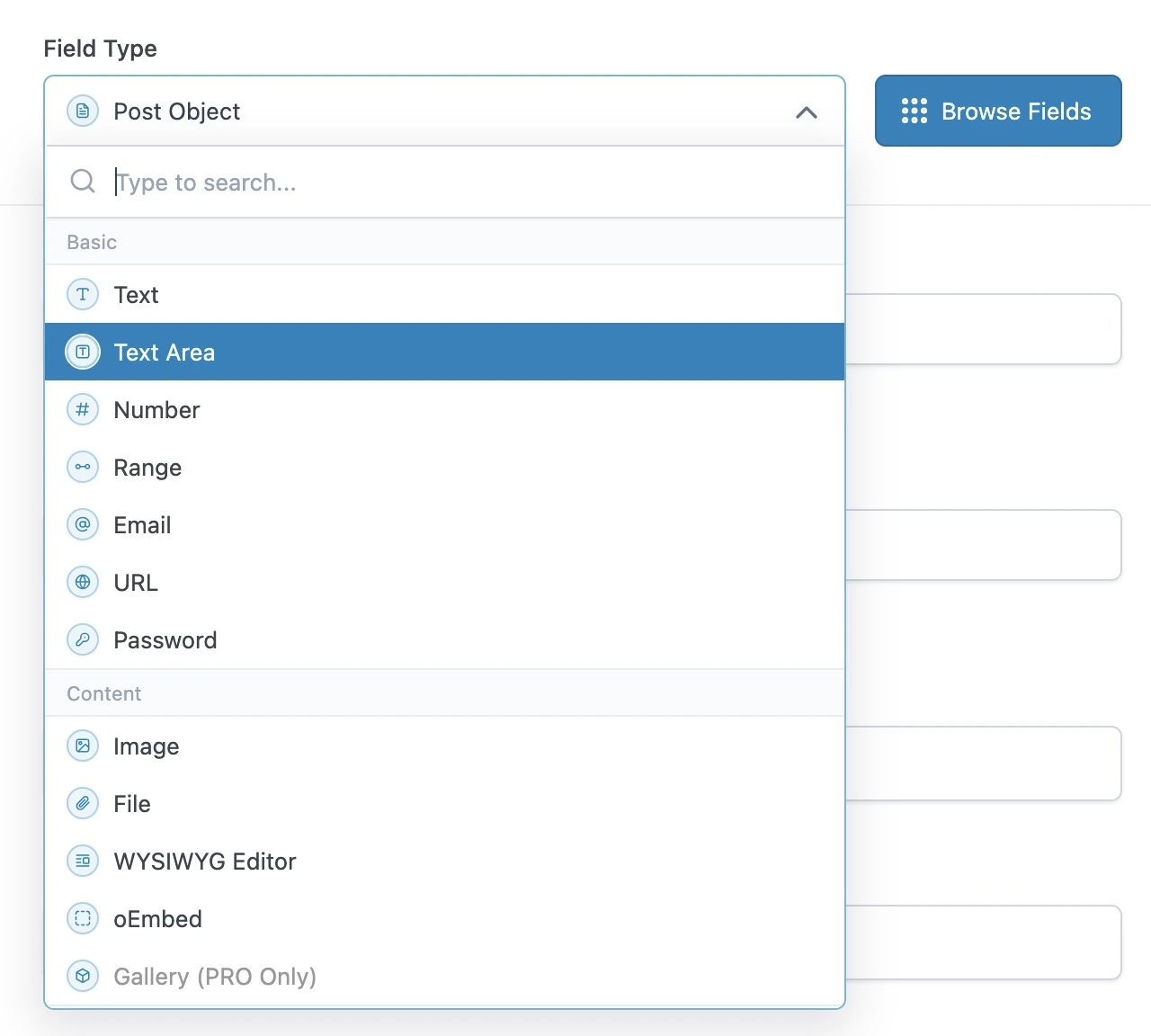
Interroger les types de champs de base
Les types de champs de base d'ACF peuvent être interrogés directement, en utilisant le champ metaValue :
query GetPost {
post(by: { id: 1 }) {
text: metaValue(key: "text_field")
textarea: metaValue(key: "textarea_field")
number: metaValue(key: "number_field")
range: metaValue(key: "range_field")
email: metaValue(key: "email_field")
url: metaValue(key: "url_field")
password: metaValue(key: "password_field")
}
}Interroger les types de champs de contenu
Si le champ personnalisé est une relation (par exemple : une image ou un fichier), nous pouvons exporter les ID depuis les champs meta, puis interroger immédiatement après ces entités (de type Media) dans une requête ultérieure.
Sinon, il s'agit d'un type de champ simple, et nous pouvons l'interroger directement en utilisant metaValue :
query GetPostDataAndExportRelationships {
post(by: { id: 1 }) {
# Image field type
imageId: metaValue(key: "image_field")
@export(as: "imageId")
# File field type
fileId: metaValue(key: "file_field")
@export(as: "fileId")
# WYSIWYG editor field type
wysiwyg_editor: metaValue(key: "wysiwyg_editor_field")
# Oembed field type
oembed: metaValue(key: "oembed_field")
}
}
query QueryPostRelationships
@depends(on: "GetPostDataAndExportRelationships")
{
# Query the image
relationshipImage: mediaItem(by: { id: $imageId }) {
id
src
}
# Query the file
relationshipFile: mediaItem(by: { id: $fileId }) {
id
src
}
}Interroger les types de champs à choix
Les types de champs à choix peuvent être interrogés comme un type de champ simple, en utilisant metaValue.
ACF stocke les tableaux de valeurs dans une seule entrée, encodée sous forme de chaîne JSON ; c'est pourquoi nous devons utiliser le champ metaValue (au lieu de metaValues) pour récupérer le tableau.
Pour les valeurs booléennes, nous utilisons le champ _equals pour le convertir de String en Boolean :
query GetPost {
post(by: { id: 1 }) {
# Select field type - Whether a single or multiple values, we always use `metaValue`
select: metaValue(key: "select_field")
multiSelect: metaValue(key: "multi_select_field")
# Checkbox field type
checkbox: metaValue(key: "checkbox_field")
# Radio button field type
radioButton: metaValue(key: "radio_button_field")
# Button group field type
buttonGroup: metaValue(key: "button_group_field")
# True/False field type
trueFalseAsString: metaValue(key: "true_false_field")
trueFalse: _equals(value1: $__trueFalseAsString, value2: "1")
}
}Interroger les types de champs relationnels
Si le champ personnalisé est une relation (par exemple : un post, un utilisateur, une taxonomie, etc.), nous pouvons exporter les ID depuis les champs meta, puis interroger immédiatement après ces entités (de type Post, User, Taxonomy, etc.) dans une requête ultérieure.
Sinon, il s'agit d'un type de champ simple, et nous pouvons l'interroger directement en utilisant metaValue :
query GetPostDataAndExportRelationships {
post(by: { id: 1 }) {
link: metaValue(key: "link_field")
# Post Object field type
post_object: metaValue(key: "post_object_field")
@export(as: "post_object_id")
# Multiple Post Object field type
post_objects: metaValue(key: "post_objects_field")
@export(as: "post_object_ids")
# Page Link field type
page_link: metaValue(key: "page_link_field")
@export(as: "page_link_id")
# Multiple Page Link field type
page_links: metaValue(key: "page_links_field")
@export(as: "page_link_ids")
# Relationship field type
relationships: metaValue(key: "relationship_field")
@export(as: "relationship_ids")
# Taxonomy field type
categoryTaxonomy: metaValue(key: "category_taxonomy_field")
@export(as: "category_taxonomy_ids")
tagTaxonomy: metaValue(key: "tag_taxonomy_field")
@export(as: "tag_taxonomy_ids")
# User field type
user: metaValue(key: "user_field")
@export(as: "user_id")
# Multiple User field type
users: metaValue(key: "users_field")
@export(as: "user_ids")
}
}
query QueryPostRelationships
@depends(on: "GetPostDataAndExportRelationships")
{
# Query the post
postObject: customPost(by: { id: $post_object_id }, status: any) {
id
title
}
# Query the list of posts
postObjects: customPosts(filter: { ids: $post_object_ids, status: any }, pagination: { limit: -1 }) {
id
title
}
# Query the page
pageLink: page(by: { id: $page_link_id }, status: any) {
id
title
}
# Query the list of pages
pageLinks: pages(filter: { ids: $page_link_ids, status: any }, pagination: { limit: -1 }) {
id
title
}
# Query the relationship post
relationships: customPosts(filter: { ids: $relationship_ids, status: any }, pagination: { limit: -1 }) {
id
title
}
# Query the list of categories
categoryTaxonomy: categories(filter: { ids: $category_taxonomy_ids }, taxonomy: "category") {
id
name
}
# Query the list of tags
tagTaxonomy: tags(filter: { ids: $tag_taxonomy_ids }, taxonomy: "post_tag") {
id
name
}
# Query the user
user: user(by: { id: $user_id }) {
id
name
}
# Query the list of users
users: users(filter: { ids: $user_ids }, pagination: { limit: -1 }) {
id
name
}
}Nous pouvons également interroger toutes les relations pour plusieurs posts, en récupérant chacune d'elles une seule fois (même lorsqu'elles sont partagées entre des posts) :
query GetPostDataAndExportRelationships
@configureWarningsOnExportingDuplicateVariable(enabled: false)
{
# Multiple posts
posts {
# Post Object field type
post_object: metaValue(key: "post_object_field")
@export(
as: "post_object_id_list",
type: LIST
)
# Multiple Post Object field type
post_objects: metaValue(key: "post_objects_field")
@export(
as: "post_object_ids_list"
type: LIST
)
}
}
query TransformRelationships
@depends(on: "GetPostDataAndExportRelationships")
{
flattenedPostObjectIdsList: _arrayFlatten(array: $post_object_ids_list)
@arrayUnique
@export(as: "post_object_ids_list")
}
query QueryPostRelationships
@depends(on: "TransformRelationships")
{
# Query the post
postObjectList: customPosts(filter: { ids: $post_object_id_list, status: any }, pagination: { limit: -1 }) {
id
title
}
# Query the list of posts
postObjectsList: customPosts(filter: { ids: $post_object_ids_list, status: any }, pagination: { limit: -1 }) {
id
title
}
}Interroger les types de champs de date
Comme une date est stockée sous forme de chaîne au format "YMD" (par exemple : "20240320"), nous devons l'analyser en un timestamp puis l'injecter dans la fonction _date.
query GetPost {
post(by: { id: 1 }) {
# Date Picker field
dateAsString: metaValue(key: "date_picker_field")
dateYear: _strSubstr(string: $__dateAsString, offset: 0, length: 4)
dateMonth: _strSubstr(string: $__dateAsString, offset: 4, length: 2)
dateDay: _strSubstr(string: $__dateAsString, offset: 6, length: 2)
dateAsTimestamp: _makeTime(year: $__dateYear, month: $__dateMonth, day: $__dateDay, hour: 0, minute: 0, second: 0)
date: _date(format: "Y-m-d", timestamp: $__dateAsTimestamp)
# Date Time Picker field
dateTime: metaValue(key: "date_time_picker_field")
# Time Picker field
timeAsString: metaValue(key: "time_picker_field")
timeHours: _strSubstr(string: $__timeAsString, offset: 0, length: 2)
timeMinutes: _strSubstr(string: $__timeAsString, offset: 3, length: 2)
timeSeconds: _strSubstr(string: $__timeAsString, offset: 6, length: 2)
googleMap: metaValue(key: "google_map_field")
colorPicker: metaValue(key: "color_picker_field")
}
}Modifier n'importe quel type de champ
Nous utilisons également les champs meta pour modifier les données de champs personnalisés ACF (ajout, mise à jour et suppression d'entrées).
Cette requête met à jour plusieurs champs personnalisés ACF en passant un seul objet JSON à la mutation updatePost.
Notez que le JSON contient des tableaux de valeurs, même lorsque l'élément est une valeur unique.
mutation UpdatePost($postId: ID!) {
updatePost(
input: {
id: $postId
meta: {
text_field: ["New text value"],
textarea_field: ["New textarea value"],
select_field: ["New select value"],
multi_select_field: ["Choice 1", "Choice 2"],
number_field: [42],
date_picker_field: ["20240320"],
}
}
) {
status
errors {
__typename
...on ErrorPayload {
message
}
}
post {
id
text: metaValue(key: "text_field")
textarea: metaValue(key: "textarea_field")
select: metaValue(key: "select_field")
multiSelect: metaValues(key: "multi_select_field")
number: metaValue(key: "number_field")
date: metaValue(key: "date_picker_field")
}
}
}Cette requête met à jour les champs personnalisés ACF en masse, en utilisant la mutation updateCustomPostMeta :
mutation UpdatePost($postId: ID!) {
updateCustomPostMetas(inputs: [
{ id: $postId, key: "text_field", value: "New text value" },
{ id: $postId, key: "textarea_field", value: "New textarea value" },
{ id: $postId, key: "select_field", value: "New select value" },
{ id: $postId, key: "multi_select_field", value: ["Choice 1", "Choice 2"] },
{ id: $postId, key: "number_field", value: 42 },
{ id: $postId, key: "date_picker_field", value: "20240320" },
]) {
status
errors {
__typename
...on ErrorPayload {
message
}
}
customPost {
__typename
id
text: metaValue(key: "text_field")
textarea: metaValue(key: "textarea_field")
select: metaValue(key: "select_field")
multiSelect: metaValues(key: "multi_select_field")
number: metaValue(key: "number_field")
date: metaValue(key: "date_picker_field")
}
}
}